
Skip to content
No results
When autocomplete results are available use up and down arrows to review and enter to go to the desired page. Touch device users, explore by touch or with swipe gestures.
  • App download links
  • Example Release Notes
  • Feedback
  • Home
  • PhoneLine+ Customer Knowledge Base
  • Release Notes
  • PhoneLine+ features
  • What’s new?
  • Search results
  • Classic Home
  • PHONELINE+ APPLICATION – END USER LICENCE AGREEMENT
PhoneLine+ Logo.
  • PhoneLine+ features
  • App download links
Release Notes
PhoneLine+ Logo.

Getting started

5
  • PhoneLine+ Quick Start guide
  • Minimum system requirements
  • Registering and logging in
  • How to sign out and check for updates
  • Forgotten password

Making and Receiving Calls

5
  • Call short codes (all devices)
  • Choosing a number to call from
  • Making and receiving calls
  • Features during a call
  • Call activity

Call Settings & Voicemail

6
  • Call settings
  • Outbound and inbound call permissions
  • Hold music
  • Out of hours settings
  • Voicemail
  • Voice Portal codes

Managing Contacts

3
  • Adding and deleting a contact
  • Contact categories and filters
  • Managing your PhoneLine+ contacts

Integrations

5
  • WhatsApp Business integration
  • Send a message via WhatsApp Business
  • WhatsApp Business integration Q&A
  • eSIM support
  • Mobile numbers and SMS

PhoneLine+ Analytics

2
  • Create and download reports (desktop only)
  • View your PhoneLine+ Analytics

User Presence & Profile Settings

3
  • ‘My Details’ and ‘My Account’
  • Setting your user presence
  • Snooze

Sound Settings

2
  • Your audio library
  • Audio settings and ringtone selection

Device Guides

4
  • Yealink T34W User Guide
  • YeaLink T31W User Guide
  • PhoneLine+ Supported Hardware
  • Device troubleshooting

Adding & Sharing Recordings

1
  • Add/share recordings, and audio recommendations

Notifications

1
  • Manage your email notifications

Administrator Functionality

7
  • View and edit PhoneLine+ users
  • View, search for, and unassign numbers
  • Blocking numbers
  • Add and manage teams
  • Add and manage menus
  • Global Settings & Activity Log
  • Speed dials

Troubleshooting Quick Tips

3
  • Your PhoneLine+ welcome email
  • Resetting your password
  • Navigating the PhoneLine+ Customer Knowledge Base
  • Home
  • Docs
  • Polycom VVX450 and VVX250 device guide
View Categories

Polycom VVX450 and VVX250 device guide

< 1 min read

Duration: 02.05

Button layout

The VVX450 is shown primarily, but the functionality and layout of both phones are similar.
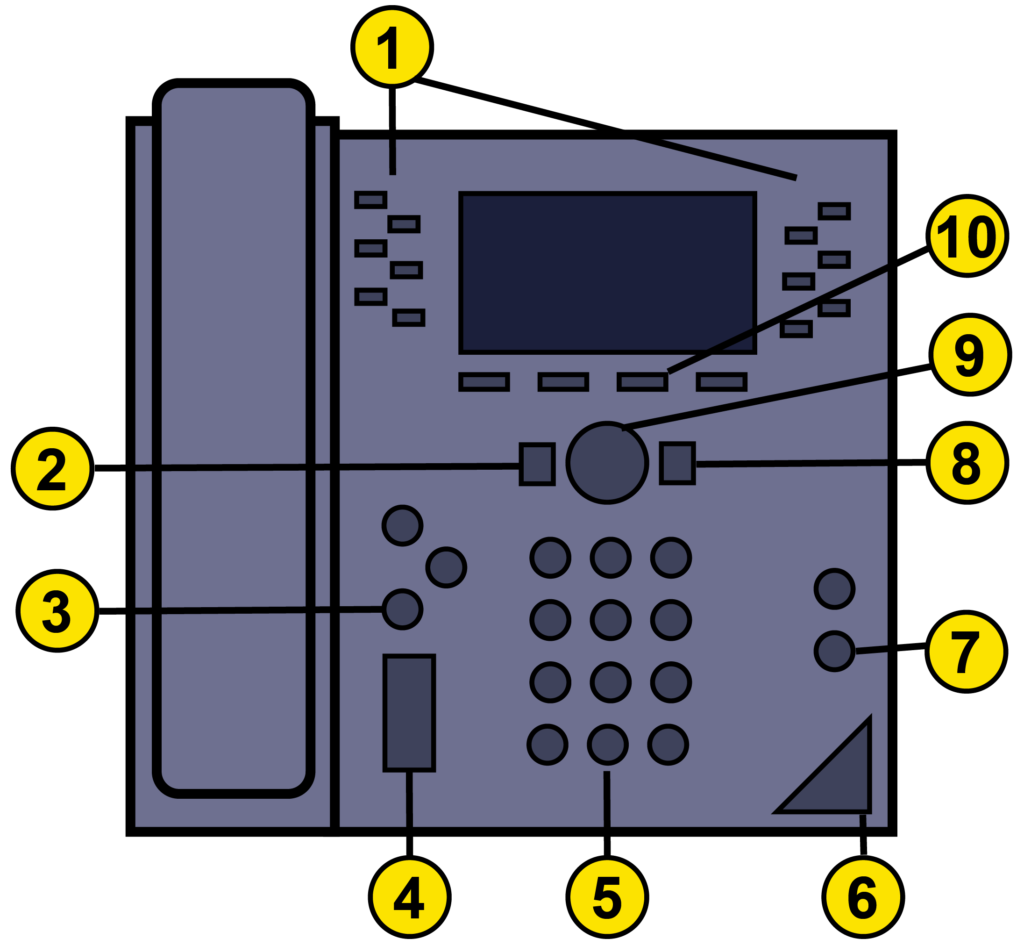
NumberFunction
1Line keys
2Back key
3Hold key
4Volume keys
5Dial pad
6Mute key
7Speakerphone key
8Home key
9Navigation keys
10Soft keys

Handset buttons and features not compatible with PhoneLine+

  • The transfer key. Call forwarding is only available within the softphone app versions of PhoneLine+.
  • Messages key.
  • Conference calling.
  • Company directory.

Call functionality

The video above contains demonstrations on making, receiving, holding, and resuming calls.

Voicemail

With PhoneLine+, your voicemail settings are only configured within the softclient (or app) itself. Voicemail settings cannot be configured on the Polycom VVX250 or VVX450 handsets. For more information on how to configure your PhoneLine+ voicemail settings on the client, visit the ‘Settings’ section of the PhoneLine+ Customer Knowledge Base.

Listening to your voicemail on the Polycom VVX250/VVX450

Once your PhoneLine+ settings have been configured on the client, you can use your Polycom handset to listen to any voicemail you receive. To do this simply dial 1571.

How do you feel about this content?
Table of Contents
  • Button layout
  • Handset buttons and features not compatible with PhoneLine+
  • Call functionality
  • Voicemail
  • Listening to your voicemail on the Polycom VVX250/VVX450
  • Home
  • PHONELINE+ APPLICATION – END USER LICENCE AGREEMENT
We use cookies to measure performance and make improvements to this service. This includes page views, device/browser, location, and page interactions. We do not collect any information you upload to this site. By agreeing, you consent for your data to be used for this purpose.