
 Audio output and volume (desktop)
show more

Audio output and volume (mobile)
show more
Troubleshooting
There are several reasons why sound may not be playing correctly.
Check that:
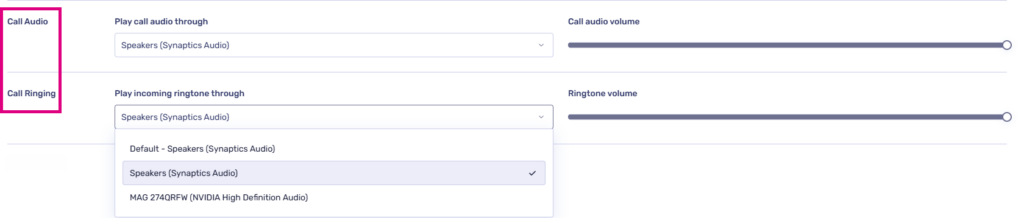
- The ‘ringing volume’ slider in PhoneLine+ is not set to zero (desktop versions)
- During a call, that you are not ‘muted’
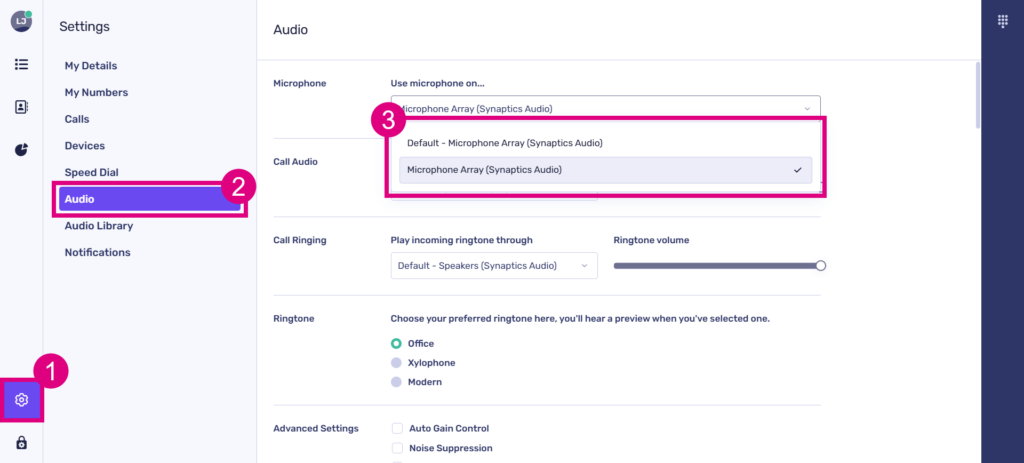
- The correct audio output is selected within the ‘Call audio’ section of sound settings (desktop versions)
- The correct output device is selected within the ‘Microphone’ section of sound settings (desktop versions)
- Your audio output is switched on, if it has a separate power source
- Your device sound is unmuted, and volume is turned up
- That your audio output is working with other programs, to determine if this issue is specific to PhoneLine+
- In your computer sound settings, that browsers or PhoneLine+ app are not muted (desktop versions).
If you are still having issues with this feature, please contact your service provider.