
Add and share recordings (desktop and mobile)
Recordings for voicemail or hold music are added via your ‘Calls’ settings screen.
From here, you can add recordings for the following features:
- Voicemail
- Out of hours
- Play a message (no voicemail)
- Hold music.

Any recordings you upload will be automatically stored in your PhoneLine+ Audio Library. These recordings can be shared with other members of your organisation, allowing them to use them within in their own PhoneLine+ call configurations.
Your Audio Library
All PhoneLine+ recordings are stored within the Audio Library. Click here to learn more.
Audio recommendations (desktop)
For desktop versions of PhoneLine+ (Windows and Mac), we highly recommend using a high-quality headset when recording and uploading your own audio. While the built-in microphone in laptops can suffice for basic tasks, it often falls short for regular audio recording or making calls.
PhoneLine+ will prompt you to update your sound settings when you connect a headset via USB, Bluetooth, or the headphone jack.
Call ringing recommendations
To ensure that you can hear incoming calls, it is recommended that ‘Call Ringing’ is set to your computer’s default speakers, and your call audio volume is high.
This can be configured within your ‘Audio’ settings > ‘Call Ringing’.

Microphone settings (Mac)
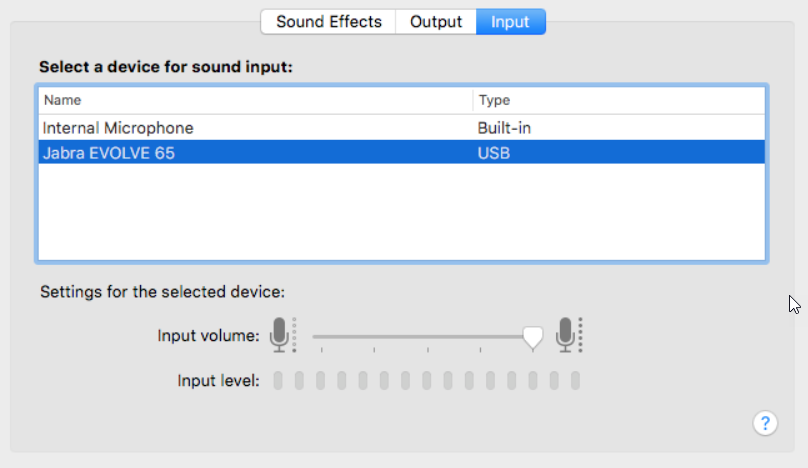
Mac users can easily set a default microphone by navigating to their ‘System Preferences’.
- First, plug in your USB headset (or connect to one via Bluetooth)
- Click your ‘System Preferences’ icon, then click ‘Sound’
Then select the ‘Input’ option and select your headset.
Audio recommendations (mobile)
Typically, mobile phones have great quality microphones and speakers as they are designed for making calls.
Your phone should automatically connect to any external headsets or devices that you connect to it via Bluetooth (for example, Apple CarPlay).
Troubleshooting
If you cannot upload a recording:
If you are not able to record or upload a new recording, please check the following:
- The file that you are trying to upload is no more than 1.5MB in size
- The music that you are trying to record is no more than 60 seconds in length.
If others within your organisation can’t use your recording:
If other users within your company are not able to use a recording that you have recorded or uploaded, please check the following:
- The ‘Shared Recording’ toggle is turned on next to the recording within the ‘Audio Library’.
If you are still having issues with this feature, please contact your service provider.